Review-first AI clipping · for iPhone

Turn long videos
into a shortlist
you actually trust.

HiClip does not guess at viral moments. It puts candidate clips, six-dimension scores, ranking reasons, and context risks in front of you, so you can review the evidence and decide what is worth publishing.

  • No virality predictions
  • Footage stays private
  • You approve every export
  • Owned or licensed video only
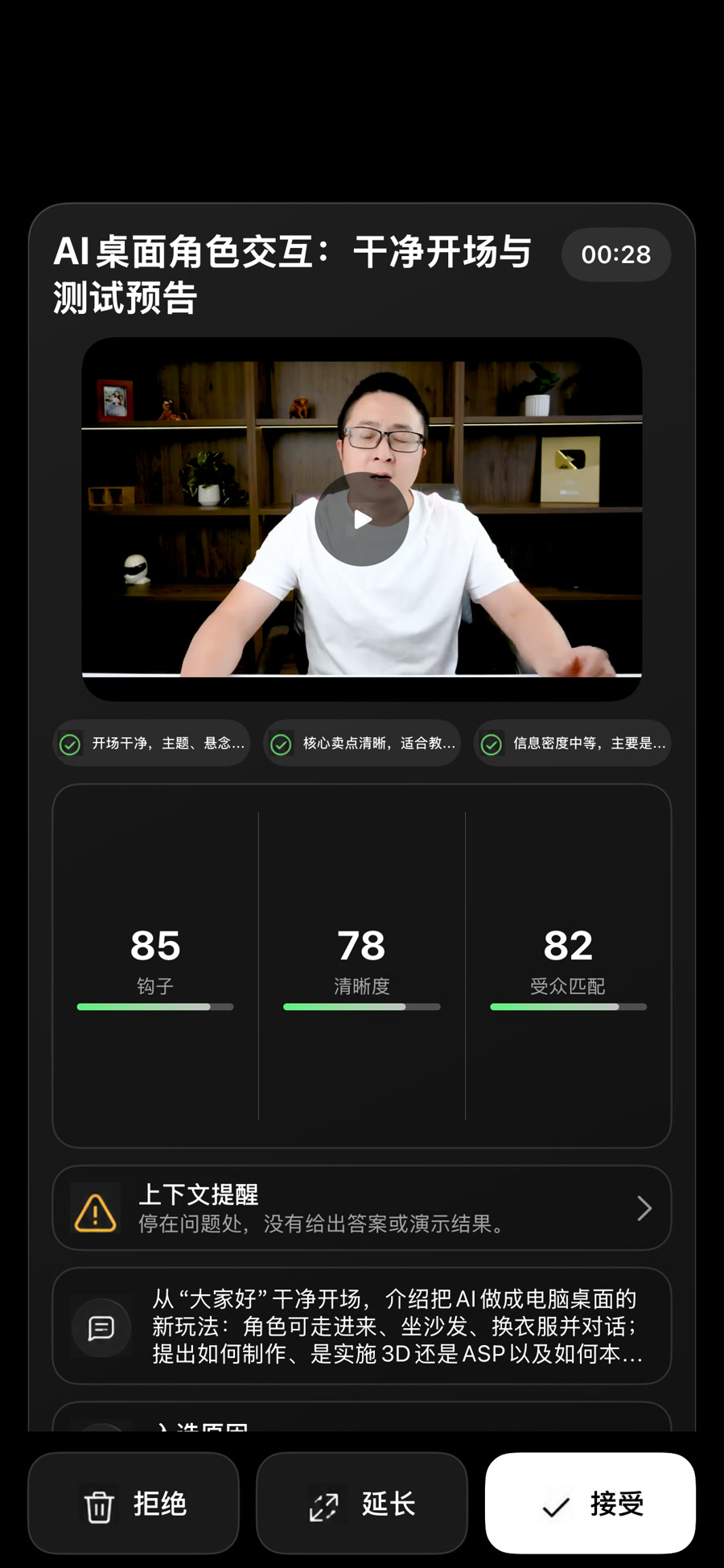
HiClip review card showing a clip preview, six scores, a context warning, and accept controls
Context warningMentions pricing without setting up the offer
86.25
Overall scoreSix weighted dimensions · explainable
12 output languages
scoring dimensions
6
candidate clips
8–15
output languages
12
finished export
1080p
Built for
PodcastsFounder interviewsCourses & tutorialsLive replaysKnowledge talksPanel discussions
One analysis · clip-by-clip review

Content rights

Process only video you have the right to use.

HiClip is an editing and review tool. It does not supply films or TV content, and it does not obtain copyright permission for you. You may import, process, export, and publish only video you shot, video you own the rights to, or video for which the rights holder has given you clear permission.

Films, TV shows, sports, paid courses, other creators’ videos, and reposted content may not be used without authorization. Editing, removing watermarks, changing subtitles, speeding up footage, or calling it a “re-cut” does not grant you a license. Unauthorized use may infringe copyright.

  • 01
    You own the footage

    Video you shot or created, or rights you acquired through transfer or a work-for-hire arrangement.

  • 02
    You have permission

    Content with clear permission from the copyright holder and from anyone whose likeness, voice, or music appears; keep the license on file.

  • 03
    No unauthorized material

    Films, TV shows, sports, paid courses, other creators’ videos, and reposted content cannot be imported, edited, exported, or published without authorization.

Why review-first

Most AI clippers give you an answer. HiClip gives you the evidence.

Cutting is not the finish line; the decision before publishing is. Instead of asking you to rewatch a pile of results, HiClip lays the selection process out in the open.

Typical AI clipper

“Here are ten viral clips we picked for you.”

  • Dumps dozens of clips on you with a title and a “viral score”
  • You discover broken context only after exporting
  • Cuts land mid-sentence, so you edit the clip again
  • The score cannot be explained, so you cannot tell how much to trust it
HiClip

“Here are twelve candidates, and here is the evidence for each.”

  • Builds candidates from complete semantic windows, never mid-sentence
  • Six scores with a specific ranking reason behind every number
  • Flags missing background, dangling references, and unfinished conclusions
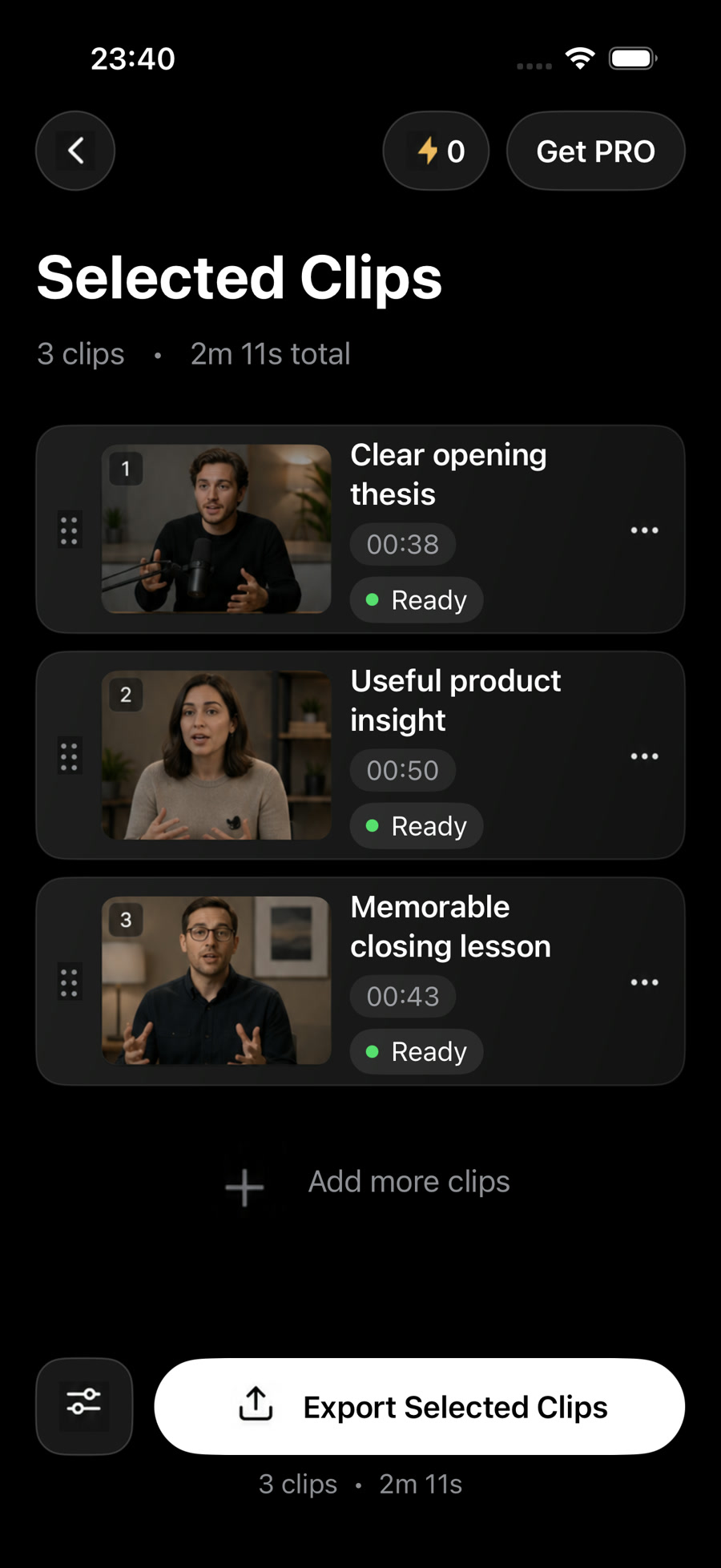
  • Accept, reject, or extend, adjust cut points, then export

Product capabilities

Every step from cut to publish keeps you in control.

This is not about adding more AI to the workflow. It is about making the AI easier to verify and steer.

Semantic windows

Cuts follow meaning, not the clock

Candidates are built from complete sentences and thoughts. HiClip protects the cut points so a clip never starts mid-sentence or loses its conclusion at the last second.

Evidence, not vibes

Six scores, each with a reason

Highlight value, standalone completeness, appeal, resonance, pacing, and cut quality are scored separately. No virality forecast and no forced “viral” formula.

Context warnings

See the risk before you publish

When a clip lacks background, contains an unclear reference, or stops on an unanswered question, HiClip flags it separately instead of hiding the risk inside a score.

Human review

The final call is always yours

Accept, reject, or extend a clip. Adjust in and out points and read the surrounding transcript. AI sorts and explains; it never presses publish for you.

12 languages

Record in one language, deliver in many

After transcription, output captions and copy in 12 languages while keeping the original timeline. Your audience does not have to share your first language.

Export ready

From candidate to finished clip

Batch export at 1080p or 720p with 9:16, 1:1, 16:9, 4:5, caption styles, and subject tracking. Save to Photos or Files, or publish to connected platforms.

The workflow

From import to publish in four steps.

Every step is visible and editable. Analysis runs on the server, so closing the app does not interrupt it.

One analysis usually leaves 8–15 reviewable candidates.

01Import

Import a long video

Choose a video from Photos or Files, or paste a YouTube or Bilibili link.

MOV, MP4, and M4V up to 2 hours per video.
02Transcribe

Transcribe and build candidates

Speech recognition creates a time-aligned transcript, then complete semantic windows become candidate clips.

Candidates are filtered for duration, completeness, and overlap to avoid repetition and broken context.
03Review

Review evidence and context

Check scores, ranking reasons, and context warnings. Accept, reject, extend, or adjust the cut points.

You get a decision brief you can verify, not an order to publish.
04Publish

Export and publish

Batch export clips and captions, save to Photos or Files, or publish to YouTube or Instagram.

1080p or 720p, five aspect ratios, three caption styles, and automatic subject tracking.

Inside the app

What does review actually look like?

No complicated timeline and no wall of metrics. Every decision centers on one question: is this clip worth publishing?

Private by default

Your video belongs to you by default.

Media goes into private storage and is accessed through time-limited signed links. When you delete a project or close your account, we delete or anonymize the related information.

  • Private object storage

    Source video, previews, and finished clips never appear on a public page and cannot be found by other users.

  • Not used for general model training

    Beyond what is needed to provide the service, we do not use your video, transcript, or review history to train general-purpose models for other users.

  • Delete and close your account

    Delete a project on its own, or close your account to permanently remove your account, projects, and files, with Apple reauthorization for deletion.

Read the full privacy policy
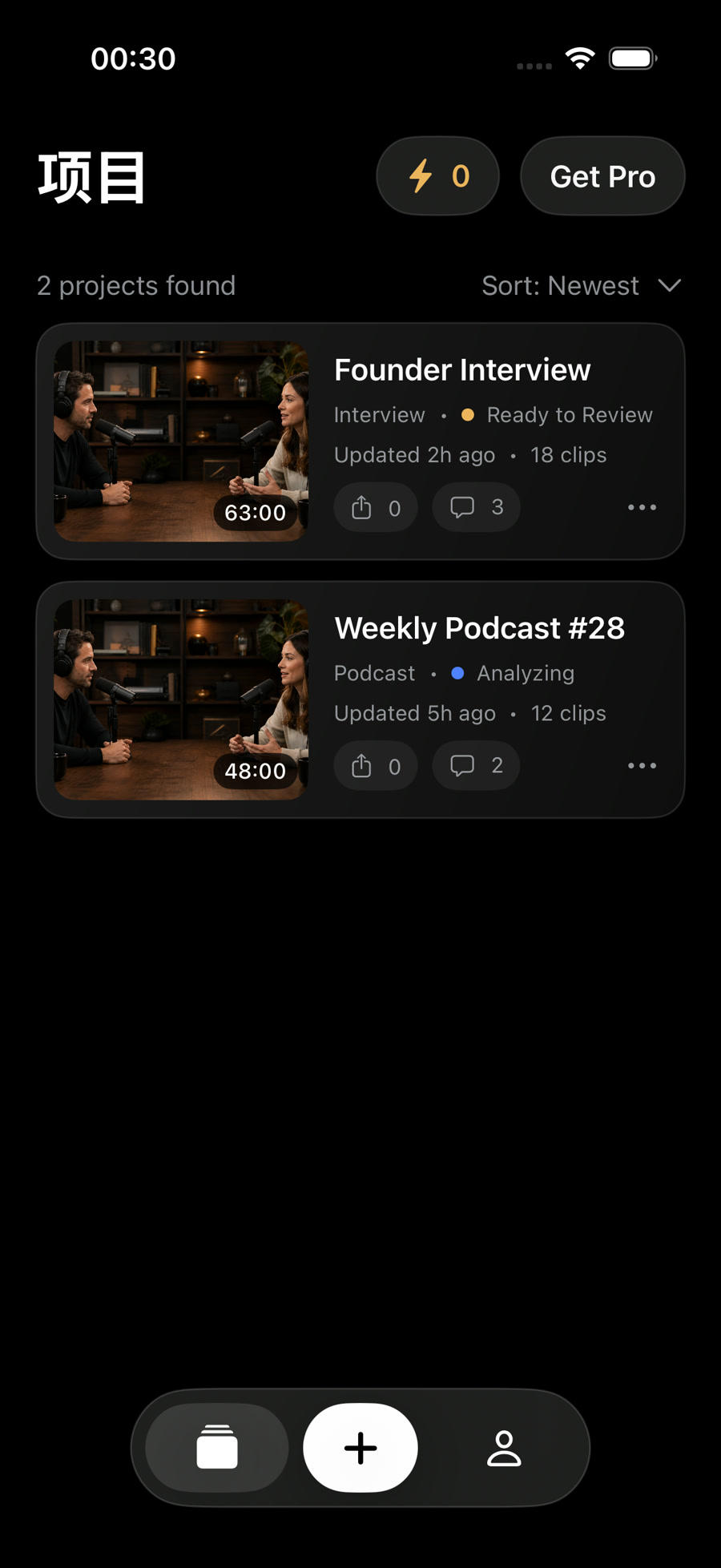
Private workspace

Your project

“Founder Interview”
VisibilityOnly you
AccessSigned links
Public pageNone
Private by default unless you export or publish

Speak every audience

Record in a language you know. Deliver in the language your audience knows.

After transcription, output captions and copy in 12 languages while keeping the original timeline. Automatic mode preserves the source language; you can also choose a target per project.

Simplified ChineseTraditional ChineseEnglishJapaneseKoreanSpanishFrenchGermanPortugueseRussianArabicHindi

Simple pricing

Start with one project, then decide whether to subscribe.

Memberships and credit packs are purchased through Apple In-App Purchase. The in-app App Store sheet shows the final price and available plans.

Credits

Pay per project

Start with one full project to see whether this review workflow fits the way you publish.

  • Import, transcription, and candidates
  • Six-dimension scoring and context warnings
  • Review and cut-point adjustment
  • Standard clip export
See credit rules

Credit packs

One-time purchase

Top up as needed when project volume varies, without tying yourself to a subscription.

  • One-time purchase
  • For occasional projects
  • Stacks with membership credits
  • Granted to your account after purchase
See credit packs

Prices vary by region, tax, and App Store promotions. Deleting your account does not cancel a subscription; manage it in the App Store.

Questions

Questions you may still have

If your question is not here, the help center has more on imports, exports, subscriptions, and privacy.

Go to the help center

No, unless you own the rights or have permission from the rights holder. Films, TV shows, sports, paid courses, other creators’ videos, and reposted content may not be imported, edited, exported, or published without authorization. Editing, removing watermarks, changing subtitles, speeding up footage, or calling it a “reaction” or “commentary” does not grant you a license.

No. HiClip does not predict views or use an invented score to decide what you publish. It turns a long video into a reviewable shortlist with six scores, specific ranking reasons, and context risks, then leaves the decision to you.

Usually 8–15 candidates, depending on duration, information density, and filtering. HiClip removes clips that are not standalone, fall outside the duration range, or overlap heavily instead of handing you every possible cut.

Yes. Accept, reject, or extend a clip during review. On the adjust screen you can drag the in and out points, use automatic snapping, and read the transcript inside and outside the clip. Only accepted clips go to export.

Your media is stored privately and accessed through time-limited signed links, never published for others to browse. Beyond what is necessary to provide the service, we do not use your video, audio, transcript, or review history to train general-purpose AI models for other users.

Import from iPhone Photos, Files, or YouTube and Bilibili links. Publish to connected YouTube and Instagram accounts. You can also save finished clips directly to Photos or Files.

HiClip is an iPhone app. It is not yet publicly listed on the App Store. Contact us for build or early-access information.

Start with evidence

Let HiClip lay out the evidence for your next batch of clips.

Request access or read the help center first. No virality predictions, just faster decisions you can verify.